

Google Search Console has rolled out a new property type that lets creators and site owners connect their social and video accounts directly to the platform. Officially called “platform properties,” the feature was announced on July 7, 2026, and gives you Search Console–style reporting — clicks, impressions, queries, and audience data — for content published on social platforms, not just your website.
In this article, we’ll break down exactly what this feature is, how to set it up, and whether it actually moves the needle on your SEO.
What Is the New Google Search Console Feature?
Platform properties are a brand-new property type inside Search Console, sitting alongside the website properties you already know. Announced by Moshe Samet, Product Manager Lead for Search Console, the feature gives you Performance, Insights, and Achievements reports for a connected social or video account — the same kind of reporting you get for a website, but built for social content that shows up in Google Search and Discover.
Google introduced platform properties to close a long-standing gap: previously, Search Console only worked for people who owned and verified a website. That left creators, influencers, and social-first businesses with no visibility into how their posts and videos were performing in Google Search — even when that content was being indexed, surfaced in Discover, or pulled into AI Overviews. Platform properties fix that by making Search Console accessible to anyone with a qualifying social account, website or not.
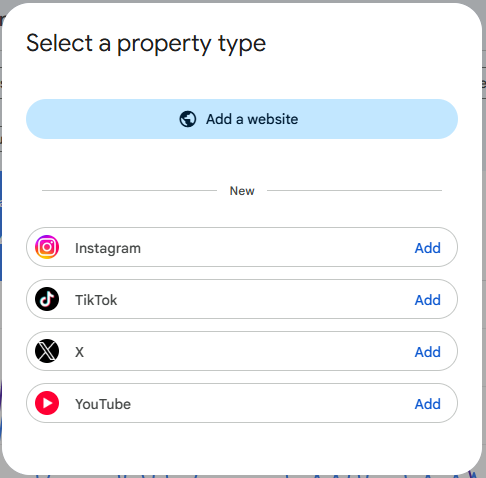
You’ll find the new option in the same place you’d normally add a site: open Search Console, click the property selector, and select Add property. From there, you’ll see the option to add a platform property alongside the usual domain and URL-prefix options.
It’s worth noting the rollout is gradual. Google has said it may take several weeks to reach every account, so if you don’t see the option yet, that’s likely just a timing issue rather than something being wrong with your account.
Which Social Media Platforms Can You Add?
At launch, platform properties support:
- TikTok
- X (Twitter)
- YouTube
Notably, Facebook is not currently supported, despite being one of the most widely used platforms for business pages. LinkedIn is also absent. Google has framed this as a starting point rather than a finished feature set, so it’s reasonable to expect additional platforms to be added over time — but as of now, only the four listed above are available.
How to Add Social Profiles in Google Search Console
Here’s the actual process, step by step:
- Sign in to Google Search Console with the Google account you want to use.
- Open the property selector in the top-left corner.
- Click “Add property.”
- Select “Platform property” and choose Instagram, TikTok, X, or YouTube from the available options.
- Sign in to the social account you want to connect and authorize the connection when prompted.
- Complete ownership verification. Google verifies you actually control the account before granting access.
- Click “Go to property” once verification is complete.
A few things to keep in mind: your existing website properties won’t be affected — the social account is added as a completely separate property. If you manage multiple brand, client, or creator accounts, double-check you’re selecting the right one before connecting, since each account has to be added individually.
Why This Feature Matters
This update matters for a few practical reasons:
- Visibility into social performance in Search. Until now, there was no reliable way to see how your Instagram Reels, TikTok videos, or YouTube content performed specifically in Google Search and Discover — you were relying on each platform’s own analytics, which don’t show Google-side data at all.
- Access without a website. Creators and social-first businesses that have never verified a website can now use Search Console for the first time.
- Query-level insight. You can see the actual search terms driving traffic to your social posts, which is data most social platforms simply don’t expose.
- A unified reporting habit. If you already monitor website performance in Search Console, you can now check social performance in the same interface, using the same familiar reports.
- Early signal of where Google is headed. The move suggests Google is increasingly treating social and video content as part of the broader Search and Discover ecosystem, not something separate from it.
Does This Improve SEO?
Here’s the honest answer: platform properties are a reporting tool, not a ranking lever.
A few important clarifications:
- It is not a direct ranking factor. Connecting a platform property doesn’t change how your website or social content ranks in Google Search.
- It doesn’t rank your website higher because you linked a profile. Unlike what some early coverage implies, this feature isn’t about “connecting” your social accounts to your website property to send entity signals — it’s a separate, standalone property purely for analytics on the social account itself.
- It measures Google Search and Discover only. It tells you nothing about whether AI chat tools or other platforms are surfacing your content — this is strictly about Google’s own search surfaces.
- It’s useful for strategy, even if it’s not a ranking input. Seeing which queries drive people to your social content can inform what topics to double down on, which is valuable even without a direct SEO boost.
Separately, and worth not confusing with this feature: adding your social profile URLs to your website’s structured data ( the same As property in Organization or Person schema) is a long-standing, unrelated practice that does help Google associate your social accounts with your brand entity. That’s a different mechanism from platform properties, and it’s still worth doing regardless of whether you set up a platform property.
Best Practices Before Adding Social Profiles
- Only connect accounts you actually own and actively manage.
- Keep branding consistent across every connected platform — same name, same imagery, same voice.
- Use the same official business name across your website, schema markup, and social profiles.
- Link back to your website from every social profile’s bio or about section.
- Keep the accounts you connect active; stale profiles won’t generate meaningful reporting data.
Common Questions
Is this available for every account? No — the rollout is gradual, so it may not appear in your Search Console account yet even if you meet the requirements.
Can I add multiple profiles? Yes. Each platform account is added as its own separate property, so you can connect multiple accounts across Instagram, TikTok, X, and YouTube.
Does it affect Google rankings? No. It’s a reporting and analytics feature, not a ranking factor.
Can I remove profiles later? Yes, platform properties can be removed from your account the same way you’d remove any other property in Search Console.
Is Facebook supported? Not currently. Only Instagram, TikTok, X, and YouTube are supported at launch.
Is Instagram supported? Yes, Instagram is one of the four platforms available from day one.
Expert Opinion
While platform properties won’t move your rankings on their own, they’re a meaningful signal of where Google is investing next: giving creators and brands a clearer window into how their content performs across Search and Discover, not just their website. Businesses that publish seriously on social — and especially those without a strong standalone website — should connect their eligible accounts as soon as the option appears. The reporting alone is worth having, and it pairs well with the separate (and still important) work of keeping your brand’s structured data and entity signals consistent across every platform you use.
Conclusion
Google’s new platform properties feature brings Instagram, TikTok, X, and YouTube performance data into Search Console for the first time, extending access to creators and businesses that don’t have a verified website. It’s not a ranking factor, but it’s a genuinely useful addition to your reporting toolkit — and a sign that Google is paying closer attention to how social content performs in Search. If you manage active Instagram or YouTube accounts, keep an eye on your Search Console account over the next few weeks and connect them as soon as the option becomes available.
